AI Short Film Character Consistency: A Shot Checklist
Plan an AI short film with character sheets, a shot list, and a continuity log. Review cuts, props, sound, and revisions before rendering the full sequence.
By Hardeep · · Updated
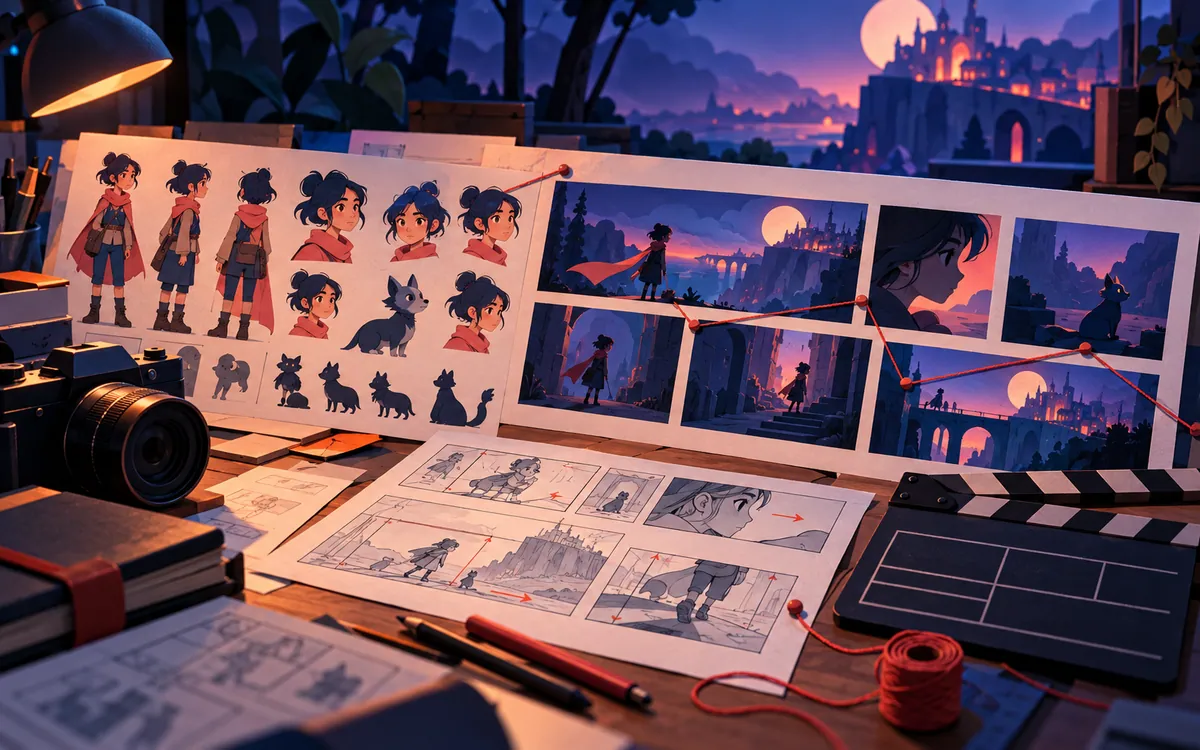
An AI short film needs continuity between shots as well as an attractive frame. Keep references for the cast and setting, then compare the last frame of one shot with the first frame of the next.
Quick answer: what keeps an AI film consistent?
Use four persistent anchors:
- A director bible that defines the story, audience, tone, visual language, and non-negotiable rules
- A multi-angle character sheet for each important person
- Location, wardrobe, and prop references for every recurring element
- A shot list with acceptance criteria and a continuity log
No tool removes the need to review the result. The goal is to make revision controlled and repeatable instead of repeatedly generating random clips.
Keep project decisions with the edit
Store the script, reference sheets, approved shots, and revision notes together. Whether the editor uses a timeline or conversational controls, another person should be able to identify the current version and the next repair needed. Export a short sequence before committing to a full film.
Step 1: write a one-page director bible
A director bible is the project’s source of truth. Keep it short enough to review, but specific enough to resolve disagreements. A practical version can use this structure:
| Section | Question to answer | Example |
|---|---|---|
| Audience | Who is the film for? | First-time founders watching silently on a phone |
| Outcome | What should the viewer understand or feel? | Relief that a complex workflow can be simplified |
| Tone | What emotional register should remain stable? | Warm, observant comedy without slapstick |
| Visual grammar | How should camera, framing, palette, and texture behave? | Natural light, restrained camera movement, muted greens |
| Character rules | What never changes? | Hair, facial marks, body proportions, base wardrobe |
| Location rules | What makes the world recognizable? | Late-afternoon park, long shadows, same bench and path |
| Exclusions | What should never appear? | No logos, text artifacts, extra fingers, or wardrobe changes |
Add the full script, a scene summary, delivery format, target duration, and any legal or brand constraints. Version the document. If the creative direction changes, update the bible first so later shots are not built from conflicting instructions.
Step 2: lock characters before generating video
A single portrait is not enough when a character turns around or appears in profile. Build a sheet showing front, three-quarter, side, back, face close-up, and a mid-length view. Use the same outfit and neutral lighting. Remove handheld props from the base sheet because the model may reproduce them inconsistently.
Keep the approved sheet attached to each shot request. Fixed descriptors and consistent references give you specific details to compare, although they do not guarantee a successful generation.
Create a small identity checklist for every shot:
- Face shape, eyes, hairline, ears, and distinguishing marks match
- Wardrobe color, layers, texture, and accessories match the current story beat
- Height and body proportions remain plausible beside other characters
- Hands, teeth, eyes, and contact with objects survive close inspection
- The character remains recognizable when paused on an unflattering frame
Step 3: treat locations and props like cast members
A location should have reference views, a layout, time of day, weather, lighting direction, palette, and recurring objects. A park is not merely “a park.” It may be a narrow urban park with a red bench, a path behind the characters, warm light from camera left, and no visible skyline.
Create prop sheets for objects that affect the story. If a phone, product package, vehicle, or piece of jewelry changes between shots, the viewer notices even when the face is perfect. For branded work, include approved logos and packaging as controlled assets rather than asking the model to redraw them.
Step 4: convert the script into testable shots
Write one row per shot. Include its purpose, duration, framing, action, dialogue, references, and pass criteria. A useful shot request sounds like this:
Six-second medium two-shot at the approved park bench. Character A remains calm while Character B notices the floating car and leans back. Preserve both approved outfits, late-afternoon light from camera left, and the red bench. No dialogue, text, extra people, or camera orbit.
This is not prompt decoration. Each sentence creates something a reviewer can check. If the shot fails, note the exact failed criterion rather than saying it “does not feel right.”
Step 5: generate in short, reviewable batches
Parallel agents can accelerate production, and InVideo documents that multiple agents may work on separate tasks while sharing project context. Parallel work also creates coordination risk. Two agents can interpret the same style rule differently or build incompatible versions of a location.
Generate a small batch, approve it, and only then expand. A sensible order is:
- Approve the main characters and one hero location.
- Generate the opening shot and one difficult angle.
- Test a two-character interaction.
- Confirm that the editing and export pipeline preserves quality.
- Generate the remaining shots in groups that share a location or lighting setup.
Step 6: assemble a rough cut early
A beautiful shot can fail inside a sequence. Assemble a rough cut as soon as the opening, middle, and ending exist. Check whether the audience can follow the story without an explanation, whether screen direction is stable, and whether the emotional escalation works.
InVideo’s official workflow guide distinguishes between an agent that plans and creates and an editor where the user refines picture and sound. That division is healthy. Let automation build a first assembly, then make a human responsible for pacing, clarity, taste, and the final export.
Step 7: revise surgically
When one shot fails, do not regenerate the entire film. Identify the smallest broken unit: a face, hand, prop, line, camera move, transition, or audio level. Lock everything else and revise only that unit.
InVideo’s help center recommends focused instructions that name the relevant section, desired length, footage to use, and details that must remain unchanged. The same method works in any editor with agent controls.
Keep a revision log with:
- Shot identifier and version
- Problem observed
- Requested correction
- References that must remain locked
- Credits or processing time used
- Decision: approved, revise again, or replace manually
Budget for failed generations, not only final minutes
AI video pricing is often credit-based. The cost of a 60-second film is not the listed cost of 60 seconds of output. It includes character exploration, discarded shots, alternate models, upscaling, voice, music, revisions, and exports.
Before production, make a ten-second proof using the most difficult character interaction and the final delivery resolution. Record the credits used for all attempts, not only the winning clip. Multiply that observed cost by the shot count and add a revision reserve.
Copyright, consent, and disclosure checklist
- Use faces and voices only with clear permission.
- Confirm commercial-use terms for every model, stock asset, font, voice, and music track.
- Do not imitate a living artist, actor, or creator in a misleading way.
- Keep source files, licenses, prompts, approvals, and model versions in a project record.
- Disclose synthetic or altered media where the platform, law, client, or audience expects it.
- Review logos, labels, and factual claims frame by frame before publishing an advertisement.
Frequently asked questions
Do I need complex prompt engineering?
No special incantation is required, but clear direction still matters. Define audience, story purpose, references, constraints, and pass criteria in plain language.
Will character sheets completely stop face drift?
No. They give the system stronger anchors and make errors easier to diagnose. Difficult angles, motion, occlusion, and interactions can still produce drift.
Can an AI agent make the final editing decisions?
It can assemble and revise a cut, but someone should own narrative clarity, timing, brand fit, factual accuracy, rights, and the final publish decision.
Is an all-in-one platform cheaper than separate tools?
Sometimes. Compare the cost of accepted output, including failed attempts and human correction. Also consider export quality, lock-in, data handling, and whether project files can be recovered outside the platform.
What to do next
Approve a small sequence before generating the rest of the film. Keep the reference sheets and continuity log beside the edit, and change them deliberately when the story changes. That makes the next failed shot easier to diagnose and repair.
A continuity check at the cut
For a fictional bench scene, compare the last frame of shot A with the first frame of shot B. Record which hand holds the phone, which way each actor faces, where the bench ends, and the direction of the light. A reference portrait alone cannot answer those questions. Keep this cut-level record beside the character sheet.
Related reading
Send a correction with this article’s link and a supporting source.